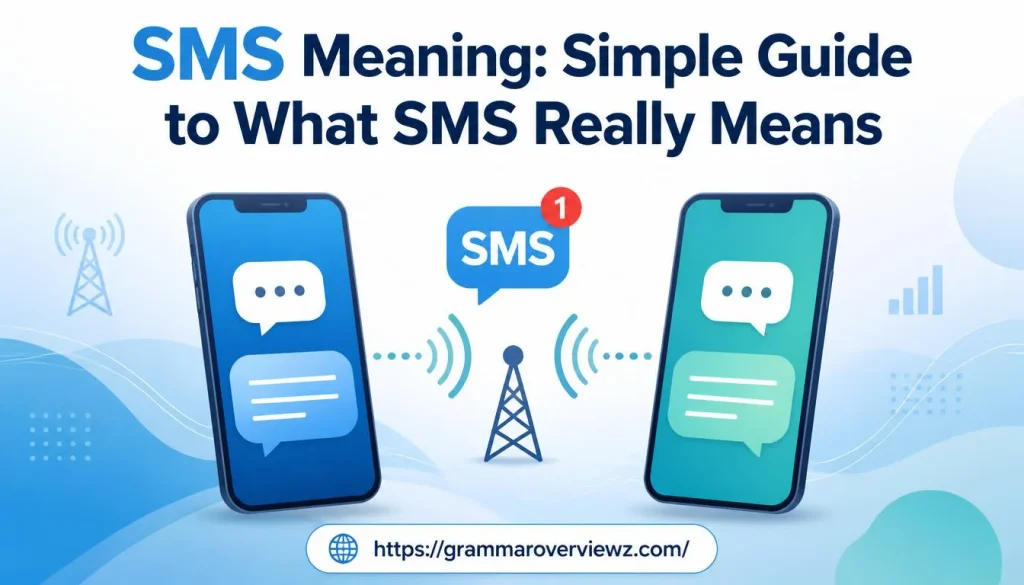

SMS Meaning: Simple Guide to What SMS Really Means explains how people send short text messages without using the internet.
SMS stands for Short Message Service, a text messaging service that allows people to exchange short text messages from one phone to another. In simple words, SMS sends plain text messages through a mobile phone network instead of the internet.
It uses mobile network signals for message transmission, making it a form of wireless communication and digital communication. The SMS meaning, SMS definition, and SMS full form describe this standard messaging service, which is supported by virtually all mobile devices.
An SMS message typically supports up to 160 characters, making it useful for personal communication, business communication, and everyday messaging. A mobile carrier handles sending and receiving messages across mobile networks. People use SMS for personal messages, business messages, and group messaging.
Unlike internet-based messaging apps, SMS does not require an internet connection or the same app on both devices. Its quick message delivery, cross-network messaging, and internet-free communication make SMS a convenient option for staying connected.
Quick Answer: What Does SMS Mean?
SMS means Short Message Service. It’s a standard mobile messaging service that lets you send and receive text messages through a cellular network.
People commonly use SMS to communicate with friends, receive verification codes, confirm appointments, and get delivery updates. Traditional SMS doesn’t normally require mobile data or Wi-Fi, although it does require compatible cellular service.
A standard SMS message can carry up to 160 characters using the GSM-7 character encoding. Messages using other character sets, including many Unicode characters, have different limits.
What Does SMS Mean?
The abbreviation SMS stands for Short Message Service. It describes a telecommunications service designed to deliver short text messages between mobile devices and, in supported systems, other compatible endpoints.
SMS became popular because it offered a simple way to communicate without making a phone call. Instead of speaking directly to someone, you could send a short written message that the recipient could read when convenient.
For example, imagine you’re running late for a meeting. Rather than calling your colleague, you could send this message:
“I’m running 10 minutes late. Please start without me.”
That message is an example of everyday texting. When you send it through your carrier’s traditional SMS service, you’re using Short Message Service.
What Does the Term Short Message Service Actually Mean?
Each word describes part of the technology:
- Short: Traditional SMS carries relatively small amounts of text compared with modern messaging systems.
- Message: The service delivers written information from a sender to a recipient.
- Service: SMS is a telecommunications feature supported by mobile networks, not a standalone messaging app.
Although SMS was designed for short messages, phones and networks can combine multiple SMS segments to deliver longer text. Your device may display the result as one continuous message, even when the network transmits several segments.
What Is the SMS Character Limit?
The traditional SMS limit is 160 characters when the message uses GSM-7 encoding. This encoding supports many common Latin letters, numbers, and punctuation marks.
However, the limit changes when your message contains characters that require another encoding method.
| Message encoding | Typical single-SMS limit | Typical concatenated segment limit |
| GSM-7 | 160 characters | 153 characters |
| UCS-2 or Unicode-based encoding | 70 characters | 67 characters |
These figures describe common SMS formats. Actual encoding and segmentation behavior can vary by network and implementation.
For example, a message containing only ordinary English letters may fit within 160 characters. Adding certain accented characters, symbols, or emoji can cause the phone to use a different encoding method. An emoji may also require multiple code units, so it doesn’t always count as one character for SMS purposes.
When a message exceeds the single-segment limit, the phone may split it into multiple linked segments. Your messaging app usually joins them visually, but your carrier may count each segment separately for billing.
What Does SMS Mean in Texting?
In everyday conversations, SMS usually means a regular text message sent through a mobile carrier. People often use the abbreviation when they want someone to send a message rather than make a call.
For example, someone might say, “I’ll send you an SMS when I arrive.” They’re simply promising to send a text message.
Here are a few common expressions and what they mean:
| Expression | Meaning |
| “Send me an SMS.” | Send me a text message. |
| “Check your SMS.” | Look at your text messages. |
| “I received an SMS alert.” | A text notification arrived on my phone. |
| “SMS verification required.” | The service may send a verification code by text. |
| “SMS charges may apply.” | Your carrier may charge for the messages. |
In casual conversation, people may use SMS and text message interchangeably. Technically, however, a text-like message could travel through SMS, RCS, iMessage, or an internet-based app.
Real-Life Examples of SMS Meaning
Consider these everyday situations:
Personal communication: Your friend asks you to text when you reach home. You send a short update through your phone’s messaging service.
Business communication: A clinic sends an appointment reminder so you don’t forget your scheduled visit.
Account security: A website sends a one-time verification code to the phone number associated with your account.
Delivery notification: A courier service sends an alert explaining that your package will arrive that afternoon.
In each case, SMS refers to the messaging service rather than a special phrase or hidden meaning.
How Does SMS Work?
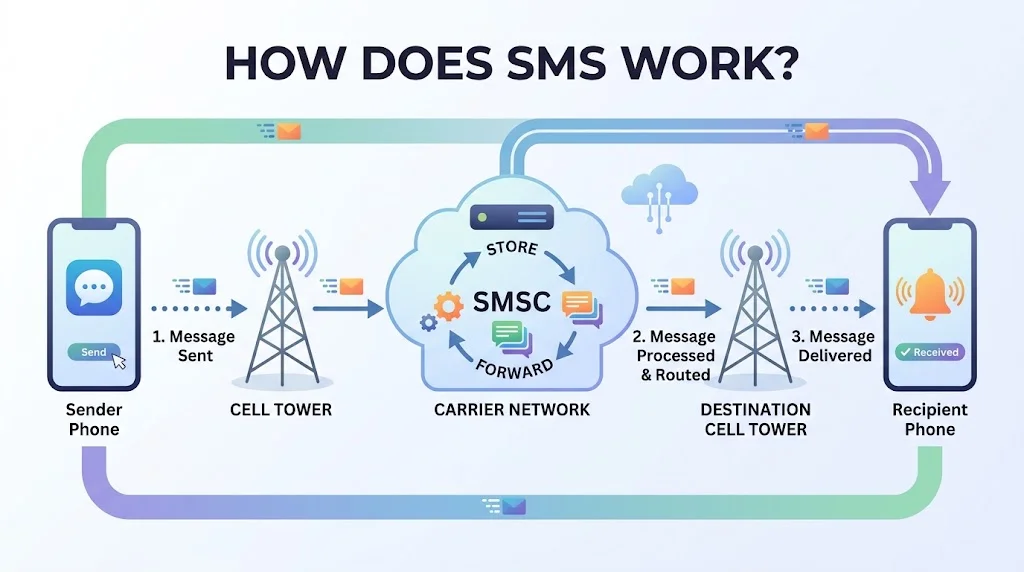
SMS might seem instant and simple, but several network components help deliver a message. When you press Send, your phone and the mobile carrier handle the technical steps behind the scenes.
<AsyncImage query=”simple telecommunications illustration mobile phone sending text message through cellular tower to another phone clean flat vector infographic no people” aspectRatio=”16:9″ width=”100%”/>
How an SMS Travels From One Phone to Another
The process generally follows these steps:
- You write a message. You enter text in your phone’s messaging app and select a recipient.
- Your phone submits the message. The device sends the SMS through the supported mobile network.
- The carrier processes it. The network routes the message toward the recipient’s carrier or destination.
- The SMSC handles delivery. The Short Message Service Center stores, forwards, and manages messages according to the network’s procedures.
- The recipient’s phone receives it. If the destination is reachable and the service supports delivery, the message appears in the recipient’s messaging app.
This process can happen quickly, although delays sometimes occur because of network congestion, weak coverage, or temporary service problems.
What Is an SMSC?
An SMSC, or Short Message Service Center, is a network component that manages SMS delivery. It can store messages temporarily and attempt delivery when the recipient becomes reachable.
Suppose you send a message to someone whose phone is switched off. Depending on the network’s policies and message validity settings, the SMSC may retain the message and try again later.
However, storage and retry behavior aren’t unlimited. A message can expire or fail if the network can’t deliver it within the applicable period.
Does SMS Work Without Internet?
Yes. Traditional SMS generally doesn’t need mobile data or Wi-Fi because it uses cellular messaging infrastructure provided by a mobile carrier.
You still need an active, compatible mobile service and suitable network access. If your phone has no usable cellular connection, ordinary SMS may fail even when Wi-Fi is available.
This distinction matters because modern phones support several messaging technologies. A message sent through RCS or an internet messaging app may require an internet connection, while a traditional SMS generally doesn’t.
What Is SMS Used For?
SMS remains useful because it provides a familiar way to deliver short messages across many mobile devices. Its uses range from casual communication to automated business notifications.
Personal Communication
People use SMS to exchange quick updates without interrupting someone with a phone call. It works well for brief messages that don’t require a long conversation.
Common examples include:
- Letting someone know you’ve arrived.
- Confirming a meeting time.
- Sharing a short reminder.
- Asking a friend to call back.
- Sending a quick update when an internet messaging app isn’t available.
For instance, you could text, “I’m outside the main entrance.” The recipient can read the message when they check their phone.
Related Post: DNF Meaning: Complete Simple Guide
SMS Verification Codes and OTPs
Many online services use SMS to send a one-time password (OTP) or verification code. The code helps a service confirm that someone can receive messages at a particular phone number.
You might receive a code when signing in, resetting a password, or confirming a transaction. The exact process depends on the service’s security system.
However, SMS verification has limitations. Attackers may exploit SIM swapping, phishing, or phone-number takeover to intercept codes or misuse them. For sensitive accounts, passkeys or authenticator-based methods can offer stronger protection when available.
Important: Never share a login verification code with someone who contacts you unexpectedly. Legitimate services generally don’t need you to tell another person your private code.
Business Communication and Customer Notifications
Businesses use SMS to send concise, time-sensitive information directly to customers. Because messages appear in a familiar messaging interface, recipients can often read them quickly.
Common business uses include:
- Appointment confirmations and reminders.
- Order and shipping updates.
- Payment and account notifications.
- Service interruptions and maintenance alerts.
- Customer support updates.
- Delivery arrival notifications.
For example, a dental clinic might send, “Your appointment is confirmed for Tuesday at 10:30 AM.” The customer receives the key details without needing to open an email.
Businesses should follow applicable consent, privacy, and messaging regulations. Marketing texts may require specific permission, and requirements vary by country.
Emergency Alerts
Mobile networks can deliver emergency alerts to compatible phones in supported regions. These systems may use cell broadcast technology, which sends alerts to devices in a selected geographic area.
Cell broadcast is not the same as ordinary person-to-person SMS. Although both involve mobile messaging, they use different delivery methods and serve different purposes.
Depending on the country and alert system, users may receive warnings about severe weather, natural disasters, or other public safety threats. Availability depends on local infrastructure, compatible devices, and government arrangements.
What Is an Example of an SMS?
An SMS can contain a simple greeting, a practical update, or an automated notification. Its meaning comes from the message’s words and context, not from the abbreviation itself.
Here are realistic examples:
| Situation | Example SMS | Purpose |
| Personal update | “I’m on my way. See you in 15 minutes.” | Shares arrival information |
| Appointment | “Your appointment is confirmed for 3:00 PM.” | Confirms a scheduled visit |
| Account verification | “Your verification code is 482913.” | Helps complete a verification step |
| Delivery | “Your package is out for delivery today.” | Provides a shipping update |
| Work communication | “The meeting has moved to 2:30 PM.” | Communicates a schedule change |
These examples illustrate common SMS content. Actual verification codes, delivery messages, and appointment details should always come from the relevant service.
How to Recognize an SMS Notification
An SMS notification often has several recognizable features:
- It appears in your phone’s messaging app.
- It may come from a mobile number or a supported sender ID.
- It may contain a short alert, confirmation, or verification code.
- It may arrive even when mobile data is turned off, provided cellular messaging works.
Still, appearance alone doesn’t prove a message is legitimate. Scammers can imitate trusted organizations, so verify unexpected requests through official channels.
What Is the Difference Between SMS, MMS, RCS, and Instant Messaging?
Not every message sent from a smartphone uses the same technology. SMS, MMS, RCS, and internet messaging apps support different features and depend on different network arrangements.
| Messaging type | Full form or meaning | Main features | Internet requirement |
| SMS | Short Message Service | Traditional text messaging | Usually no mobile data or Wi-Fi required |
| MMS | Multimedia Messaging Service | Pictures, video, audio, and supported media | Often uses carrier data services; requirements vary |
| RCS | Rich Communication Services | Enhanced messaging, potentially including typing indicators, read receipts, and high-quality media | Generally requires data connectivity |
| Internet messaging | Messaging through online apps | Chats, groups, media sharing, voice, and video features | Usually requires internet access |
SMS vs. MMS
SMS is designed primarily for text, while MMS supports multimedia content such as photos and videos. MMS can also carry certain types of longer content, depending on carrier and device support.
For example, sending “Happy birthday!” as a traditional text can use SMS. Sending a photo of the birthday cake may use MMS or another supported messaging method.
MMS support, file limits, and charges vary between carriers and plans. Some phones may use internet-based services for media sharing instead.
SMS vs. RCS
RCS offers more advanced messaging features than traditional SMS. Depending on the implementation, it may support typing indicators, read receipts, higher-quality media, and improved group conversations.
Unlike traditional SMS, RCS generally relies on data connectivity and compatible services. Both sender and recipient may need supported devices, apps, networks, or service settings to use its enhanced features.
If RCS isn’t available, a messaging app may offer another delivery method. Whether it falls back to SMS depends on the device, app, and configuration.
SMS vs. WhatsApp and Messenger
Apps such as WhatsApp and Facebook Messenger generally send messages over the internet. They can support group chats, photos, videos, voice messages, and other features beyond traditional SMS.
SMS has a different advantage: it can reach compatible phone numbers without requiring both people to use the same messaging app.
The best choice depends on your needs. SMS works well for straightforward text messages, while internet-based apps offer richer communication tools when both parties have suitable access.
Related Post: Soft Launch Meaning: A Complete Beginner-Friendly Guide
Does SMS Require Internet Access?
Traditional SMS generally doesn’t require an internet connection. It uses a mobile carrier’s messaging infrastructure rather than relying on the same internet connection used by web pages and online messaging apps.
However, this doesn’t mean SMS works everywhere. Your phone needs compatible mobile service, and the carrier must support message delivery.
What You Need to Send an SMS
In typical circumstances, you need:
- A phone or device that supports SMS.
- An active mobile plan or service that permits messaging.
- A compatible cellular connection.
- The recipient’s correct phone number.
- A carrier and destination that support the message route.
International SMS may also depend on roaming arrangements, country codes, and carrier restrictions.
Why SMS and Internet Messages Behave Differently
Imagine your mobile data is switched off, but your phone still has cellular service. A traditional SMS may continue to work, while WhatsApp messages may fail until internet access returns.
Now imagine your phone has Wi-Fi but no usable cellular service. An internet messaging app may still work, but ordinary SMS might not.
| Connection situation | Traditional SMS | Internet messaging app |
| Cellular service available, mobile data off | Usually works | Usually needs Wi-Fi or another internet connection |
| Wi-Fi available, no usable cellular service | Usually unavailable | Usually works if internet access is active |
| No cellular or internet connection | Generally unavailable | Generally unavailable |
These are general examples. Wi-Fi calling, carrier-specific services, and newer network features can change how some devices behave.
What Is the Difference Between SMS and a Text Message?
The terms SMS and text message often mean the same thing in everyday conversation, but they aren’t always technically identical.
SMS is a particular mobile messaging service. A text message is a broader everyday description of a written message sent electronically.
For example, someone might say, “I sent you a text.” That message could have traveled through SMS, RCS, or another messaging platform.
The distinction becomes useful when troubleshooting delivery problems. If a message fails, knowing whether the app tried SMS, RCS, or an internet service can help you identify the cause.
In short, every SMS is a text message in the usual sense, but not every message people call a text necessarily uses SMS technology.
What Does SMS Mean on Android and iPhone?
Android phones and iPhones both support SMS, but their messaging apps may offer different features. The appearance of a conversation doesn’t always tell you which messaging technology delivered a message.
SMS on Android
On Android, SMS typically works through the phone’s default messaging app, such as Google Messages. The app may support SMS, MMS, and RCS, depending on your device, carrier, software, and settings.
When you send a message, the app may use RCS if the conversation supports it. Otherwise, it may use SMS or another available method.
To check your settings in Google Messages:
- Open Google Messages.
- Tap your profile picture or account icon.
- Open Messages settings.
- Look for RCS chats or the relevant messaging options.
The exact menu names can vary by app version and device.
SMS on iPhone
On an iPhone, the Messages app supports SMS, MMS, RCS where available, and Apple’s iMessage service.
The familiar blue and green message bubbles help distinguish certain message types:
- Blue bubbles: iMessage conversations.
- Green bubbles: Messages sent through non-iMessage services, including SMS, MMS, and supported RCS conversations.
A green bubble doesn’t automatically mean that your message used SMS. The underlying service depends on the recipient, settings, carrier support, and available connectivity.
For example, if you message an Android user, your iPhone may use RCS or SMS, depending on compatibility and configuration.
What Are the Advantages and Disadvantages of SMS?
SMS remains practical because it works across a wide range of mobile phones. However, its simplicity comes with limitations.
Advantages of SMS
1. No mobile internet is usually necessary. Traditional SMS can work when mobile data and Wi-Fi are unavailable, provided cellular messaging service remains accessible.
2. Broad device compatibility. SMS works with many modern smartphones and basic mobile phones. Recipients generally don’t need to install the same messaging app.
3. Simple and convenient communication. You can send short updates, reminders, and confirmations without setting up a separate online account.
4. Useful for automated notifications. Organizations can use SMS to deliver appointment reminders, delivery alerts, and account updates.
5. Suitable for time-sensitive updates. A brief text can communicate essential information without requiring the recipient to answer a call.
Disadvantages of SMS
1. Limited message length. The traditional 160-character limit can require longer messages to be divided into multiple segments.
2. Fewer interactive features. SMS doesn’t natively offer the full range of features available in modern messaging apps, such as rich reactions, advanced group tools, or high-quality media sharing.
3. Possible charges. Some carriers charge for SMS messages, particularly when users exceed plan limits or send international texts.
4. Delivery isn’t guaranteed. Weak coverage, carrier problems, incorrect numbers, and blocked messages can prevent successful delivery.
5. Limited privacy protections. Traditional SMS generally lacks end-to-end encryption, and SMS-based verification can be vulnerable to phone-number takeover.
For everyday updates, SMS can be a convenient choice. For confidential conversations or sensitive account access, consider a more secure alternative when available.
Is SMS Safe and Private?
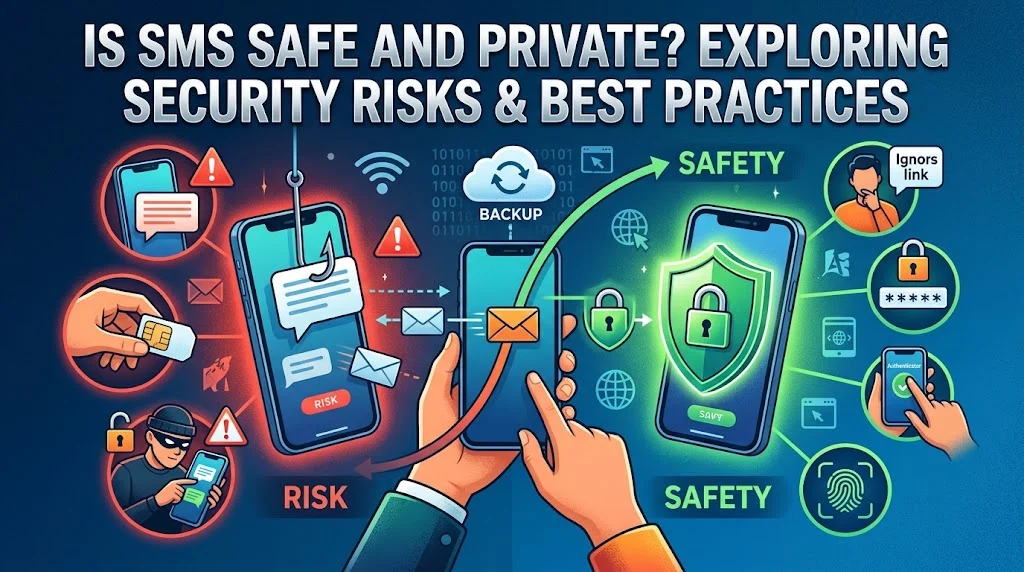
SMS is widely used, but convenience doesn’t automatically mean security. Traditional SMS generally isn’t end-to-end encrypted, meaning you shouldn’t treat it as a highly private communication channel.
The level of protection depends on the network, device, service, and potential threats. Users should take extra care when messages contain sensitive information.
Common SMS Security Risks
Phishing messages: A fraudulent text may pretend to come from your bank, courier, or government agency. It may ask you to click a link and enter personal information.
Sender spoofing: Scammers may make a message appear to come from a familiar number or organization. A recognizable sender name doesn’t guarantee authenticity.
SIM swapping: An attacker may persuade a mobile carrier to transfer your number to a SIM card under their control. If successful, the attacker may receive your SMS verification codes.
Unwanted disclosure: Someone with access to your unlocked phone or message backups may be able to read stored texts.
How to Use SMS More Safely
- Never share one-time passwords or login verification codes with unexpected callers or message senders.
- Avoid clicking suspicious links in unsolicited messages.
- Contact organizations through their official apps, websites, or verified phone numbers.
- Use passkeys or authenticator apps when supported, especially for important accounts.
- Set a strong screen lock and protect your mobile carrier account.
- Enable additional account protections, such as a carrier account PIN, when available.
SMS verification is better than having no additional login check in many situations. However, it generally offers less protection against phone-number takeover than phishing-resistant authentication methods.
Common SMS Problems and Their Solutions
When an SMS fails, the cause may involve your phone, carrier, account, or recipient. A few basic checks can help you narrow down the problem.
Why Is My SMS Message Not Sending?
If your message remains unsent, try these steps:
- Check cellular coverage. Move somewhere with a stronger signal if reception is weak.
- Verify the recipient’s number. Include the correct country code for international messages.
- Check your mobile service. Confirm that your plan supports SMS and that your account has no relevant restrictions.
- Review messaging settings. Make sure your phone is using the correct SIM and messaging configuration.
- Restart your phone. A restart may resolve a temporary device or network issue.
- Contact your carrier. If the problem continues, ask whether an outage or account restriction affects messaging.
If only one recipient is affected, the issue may involve their number, network, or device rather than your entire messaging service.
Why Am I Not Receiving SMS Messages?
First, check whether your phone has cellular service and can receive calls or other messages. Then review blocked numbers, message filtering, and any settings that may affect incoming texts.
If you’re using a dual-SIM phone, confirm that the relevant number and SIM remain active. Restarting the device may also help.
When messages from several senders fail to arrive, contact your carrier. A network issue or account configuration problem may require their assistance.
Why Is My SMS Verification Code Not Arriving?
Verification codes can be delayed or blocked for several reasons. The service may have an incorrect phone number, a delivery restriction, or a temporary problem with its messaging provider.
Try the following:
- Confirm that your account contains the correct phone number.
- Check that your phone can receive ordinary SMS messages.
- Wait briefly before requesting another code.
- Make sure you’re entering the newest code, since older codes may expire.
- Check whether the service supports your country, carrier, and phone number.
- Use another official verification method if the service provides one.
Avoid repeatedly requesting codes within a short period. Some services impose temporary limits to prevent abuse.
If ordinary texts arrive but verification codes don’t, the problem may involve the sender’s messaging service or restrictions on automated messages.
Frequently Asked Questions
1. What does SMS stand for?
SMS stands for Short Message Service. It is a text messaging service that allows people to send short messages between mobile devices.
2. What does SMS mean in texting?
In texting, SMS means sending plain text messages through a mobile phone network. It is commonly used for everyday and personal communication.
3. Does SMS require an internet connection?
No, SMS does not require an internet connection. It uses your mobile carrier’s network to send and receive text messages.
4. What is the maximum length of an SMS?
A standard SMS message can contain up to 160 characters when using the standard GSM character set. Certain characters or language settings may change the limit.
5. What is the difference between SMS and internet messaging?
SMS uses a mobile carrier’s network, while internet messaging apps rely on an internet connection. SMS generally works without installing a specific messaging app.
6. Can SMS be used for business communication?
Yes, SMS is widely used for business communication. Companies send appointment reminders, delivery updates, verification codes, and short notifications through SMS.
Conclusion
Understanding SMS meaning helps you recognize how everyday text messaging works. SMS (Short Message Service) provides a simple way to exchange short messages through a mobile phone network without requiring internet access. From personal communication to business notifications, SMS remains a practical messaging option for people and organizations worldwide. Its simplicity, broad device support, and convenient message delivery make it useful for everyday communication.